Establish a comparable product and currency
Confirm the offers belong to the same trade item, selling unit, size and variant. A shared valid GTIN can group offers across suppliers, but it cannot correct a supplier's wrong packaging description or turn a case price into a unit price. Review the original feed when the unit is unclear.
In Offers, use Search offers to find the product and choose Offer currency. Feednaro compares one currency at a time and does not automatically convert currencies. A USD number and an EUR number are separate prices, even when one number is smaller.
Open the product
Choose its name or Compare offers link. In Compare offers, check each supplier SKU and currency against the supplier's file.
Check quantity and recency
Review Supplier availability, Minimum order and Offer last read for each candidate. The source's Last successful import describes the source check; it does not prove every offer was included in that file.
Read the comparison basis
Prices exclude VAT and delivery. Confirm freight, tax treatment, payment terms, pack multiples and any other purchasing conditions with the supplier before acting.
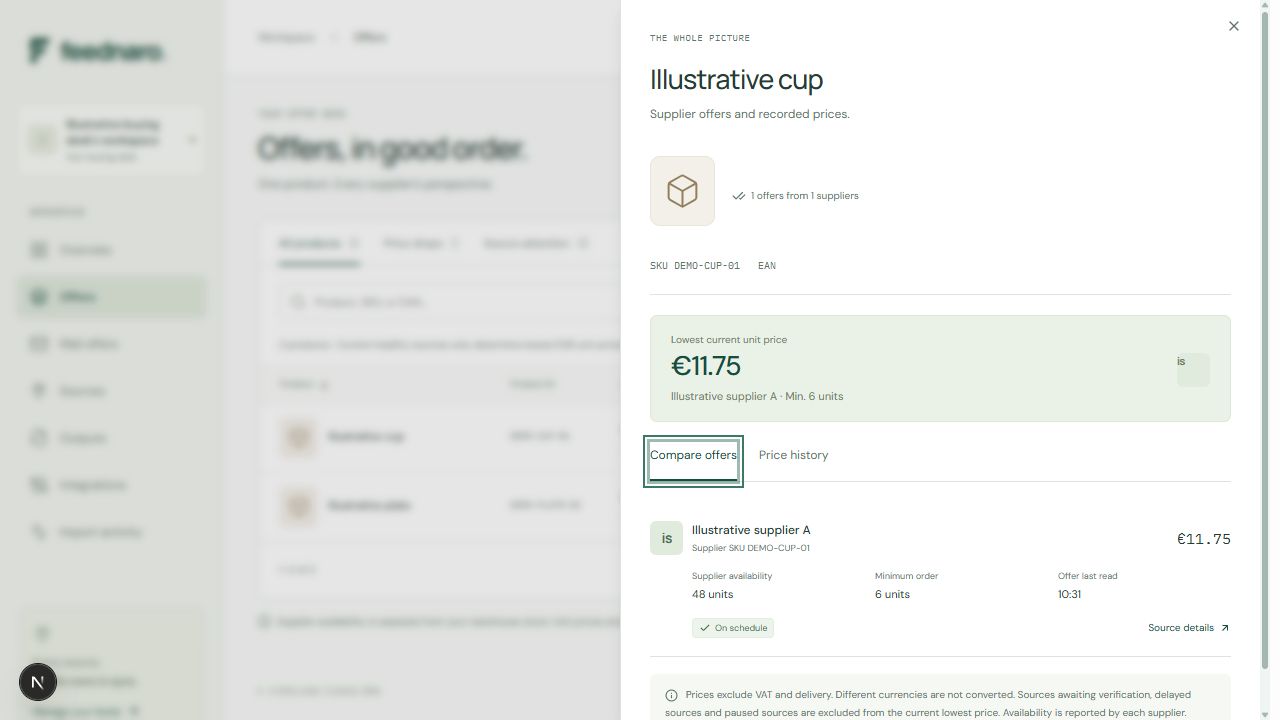
Work through an illustrative six-unit purchase
The invented offers below refer to the same illustrative product and the same selling unit. They are an arithmetic example, not customer results or a claim about connected suppliers. Suppose the buyer needs six units and the application reports the source states shown.
| Supplier | Unit price | Minimum order | Available | Source state | What to review |
|---|---|---|---|---|---|
| A | EUR 12.50 | 6 | 48 | Healthy, current settings | Six units cost EUR 75.00 before other charges. |
| B | EUR 11.75 | 24 | 120 | Healthy, current settings | Lower unit price; its minimum requires EUR 282.00 of product. |
| C | EUR 10.90 | 6 | 48 | Delayed | Retained price is excluded from the current lowest-price calculation. |
| D | USD 11.20 | 6 | 48 | Healthy, current settings | Separate currency; cannot be ranked against EUR offers. |
Separate a lower unit price from a suitable order
With Offer currency set to EUR, supplier B has the lowest eligible unit price in the example. The application does not make supplier A the lowest because the buyer wants six units: minimum order is displayed as an offer condition and does not change the unit-price ranking.
The calculations EUR 12.50 × 6 = EUR 75.00 and EUR 11.75 × 24 = EUR 282.00 are manual illustrations of those minimums. They are not totals calculated by Feednaro. Whether buying additional stock is acceptable depends on the buyer's demand and terms; a lower unit price alone cannot answer that question.
Check whether Minimum order is expressed in individual units, packs or another selling unit. A minimum of 6 is not enough information if one supplier's row means six cases and another means six individual items. Feednaro preserves the supplied quantity; it does not infer pack conversions, order multiples or volume-discount tiers.
Treat availability and freshness as separate checks
Current lowest-price calculations require the selected currency, positive supplier-reported availability, a healthy source, an unexpired offer and verification under the source's current settings. Delayed, paused or pending sources cannot determine that lowest price. Retained offers and history can still explain earlier observations.
Read Offer last read for the candidate itself. A changes-only file may update another product while leaving this offer untouched. Failed imports preserve earlier good values and timestamps, so a recent failed attempt does not make an old price current.
For an active scheduled source, an owner or admin can review Details and request Import now. For a manual source, use Upload file and review the supplier's latest CSV before Update offers. Increasing Offers remain fresh for (hours) changes the allowed age; it does not fetch or independently confirm a new price.
Supplier availability is the quantity reported by the supplier. It is separate from your warehouse inventory, a reservation and a guarantee that the supplier will fulfil an order. Confirm the final terms and availability through your normal purchasing process.
Use history to explain the observation
Open Price history and choose History supplier for the supplier-and-SKU offer in the currency you are reviewing. Compare the Date, Unit price and Source rows. Observations show what a successful import read, not the exact moment a supplier changed its price.
A lower current price may be worth investigating. It does not establish a market-wide saving, a guaranteed future price or a complete cost advantage. Keep the original file, observation time and supplier terms with any purchasing explanation.
Export view creates a CSV of the current filtered products and their selected current offers. Check the filters before exporting. That export is neither an all-supplier quotation pack nor a full price-history export.
Compare your own supplier offers.
Create a workspace, import your supplier data and review prices in one currency.