Give each identifier one job
Supplier SKU identifies an offer within one source. Keep the supplier's stable code in this field so later files update the intended offer. A product name, category or variant is useful context, but none of them makes two offers the same product.
EAN / GTIN is an optional shared product identifier. Feednaro accepts GTIN-8, GTIN-12, GTIN-13 and GTIN-14 values with a valid check digit. Accepted values are compared in a 14-digit representation with leading zeros added where needed. This representation does not turn one packaging level into another.
GS1 describes GTIN as the identifier for a trade item. Ask the supplier to confirm the identifier belongs to the exact size, variant and selling unit you are buying. Feednaro checks the number's structure; a passing check digit does not verify its owner or prove that the supplier assigned it to the right product.
| Field | Scope | What it establishes |
|---|---|---|
| Supplier SKU | One source | Which offer a later row updates. |
| EAN / GTIN | Across sources | A shared product key when a valid value is provided. |
| Product name / category / variant | Supplier context | Readable context; no automatic name or fuzzy matching. |
Work through three matching outcomes
This is an illustrative identity exercise, not customer data or a claim that these offers were imported. The phrase shared GTIN below stands for one genuine identifier confirmed by the suppliers; it is not a value to paste into a feed.
Supplier A's A-104 and supplier B's B-22 can belong to one product when both provide the same valid GTIN for the same trade item. Their supplier names, SKUs, prices and minimum orders remain separate offers. If B-22 has no mapped GTIN, its similar name cannot establish that match.
| Source and SKU | Mapped EAN / GTIN | Result |
|---|---|---|
| Supplier A · A-104 | Shared, supplier-confirmed GTIN | Product identified by that valid GTIN. |
| Supplier B · B-22 | The same valid GTIN | Another supplier offer on the same product. |
| Supplier C · A-104 | Blank | Source-specific product; matching SKU text alone does not join it to A. |
| Supplier D · D-50 | A non-empty invalid value | Invalid row, handled by the selected row policy. |
Review identity fields before the first import
Keep identifiers as text when preparing files. Spreadsheet number conversion can remove leading zeros or produce scientific notation. Do not invent an identifier, copy a barcode from a similar product or map an internal part number into EAN / GTIN to force a group.
Choose the supplier's stable offer code
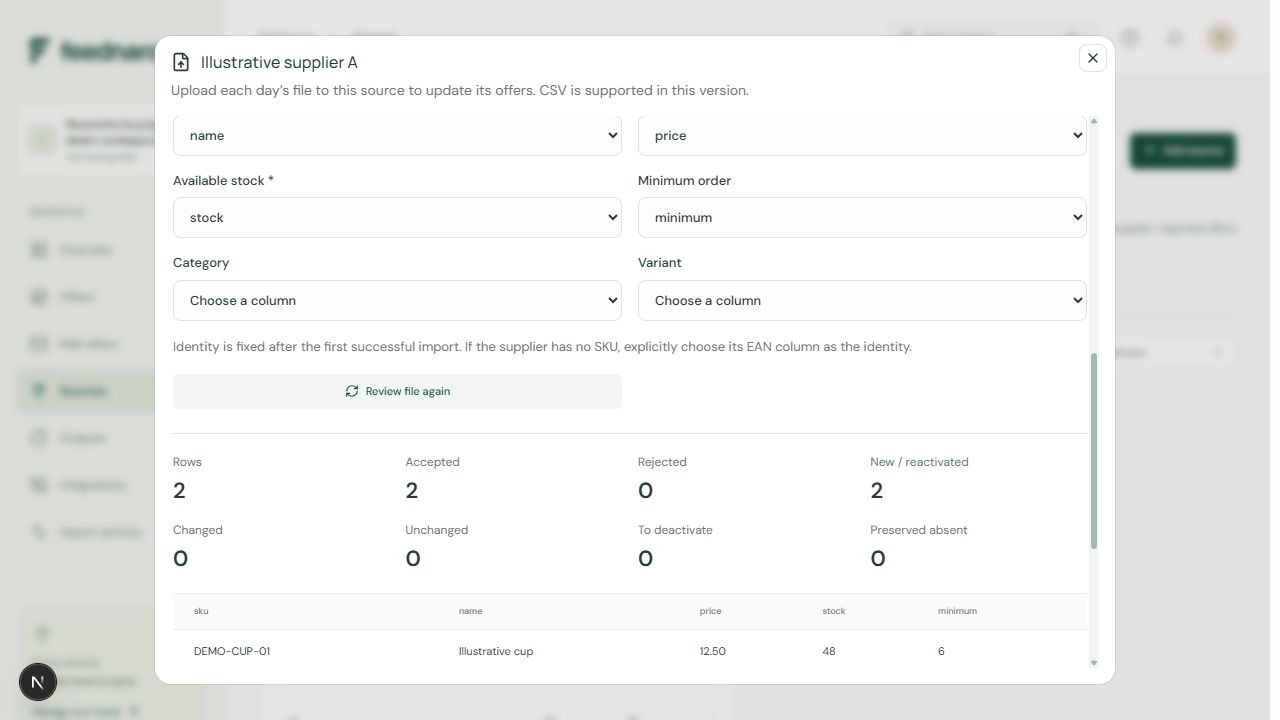
In the scheduled feed wizard, review Supplier SKU field. In a manual source, review Supplier identity (SKU or EAN). If the supplier has no SKU, explicitly choosing its EAN column as the supplier identity is supported; the shared EAN / GTIN field still needs its own deliberate mapping.
Map the shared identifier separately
Select EAN / GTIN only when the column contains the supplier-confirmed identifiers. Check sample values, supported lengths and leading zeros. Blank or unmapped GTIN values keep a source-specific product identity.
Validate the file
Review the complete-file invalid counts and field errors. A non-empty bad GTIN invalidates its row. Duplicate supplier identities invalidate every occurrence of that identity. Correct the feed or choose the intended invalid-row policy before importing.
Verify the resulting product
After the import completes, search Offers by a known SKU or EAN and open Compare offers. Confirm the expected supplier SKUs appear together and refer to the same unit, size and variant. Check a few known unmatched products too.
Keep packaging differences and missing evidence visible
A single item and a case can be different trade items with different identifiers. Confirm the packaging level with the supplier. Do not remove a meaningful digit or replace a case GTIN with a unit GTIN simply to obtain a shared product in the comparison.
Matching identity does not convert pack prices, divide case quantities or reconcile a supplier's incorrect description. Review unit price, availability and minimum order against the same selling unit. A correct match is only the start of a purchasing comparison.
If genuine GTINs are unavailable, retain the source-specific identities and resolve the catalogue question with the supplier. Feednaro does not automatically merge products by name similarity or by matching SKU text across sources. Invalid rows and missing identifiers should remain visible rather than being disguised as successful matches.
Check identity again when a mapping changes
A later file may rename a header, supply a different packaging identifier or stop including GTIN values. Treat that as a data review, even if the connection still downloads successfully. Compare known products with the original file and inspect Import activity before trusting the new groups.
A changed mapping needs a successful import under the current settings before its offers enter current lowest-price comparisons. Earlier observations remain in history. Review product identity and the supplier-and-SKU history series together so a catalogue correction is not mistaken for an ordinary price movement.
Review the identity in your supplier file.
Create a workspace and check SKU and GTIN mapping before the first import.